Say goodbye to the hassle of fickle remotes! Discover quick and easy ways to troubleshoot and fix your remote—without any technical knowledge.
Common Remote Problems (and Easy Fixes)
Before you jump to conclusions or throw away your remote, consider these common problems—most of them have simple solutions.
Dead batteries: Often the biggest culprit!
Blocked signal: Objects or faulty sensors can interfere with the infrared beam.
Dirty contacts: Dirt and oxidation can prevent proper electrical contact.
Physical damage: Drops or impacts can loosen internal components.
Let’s take a closer look at how to troubleshoot and fix each problem.
1. Check and replace the batteries
If your remote suddenly stops responding, it’s likely a power issue.
Steps:
Open the battery compartment and check that the batteries are installed correctly.
Replace the batteries with new, high-quality ones.
Try changing the position slightly to restore the connection.
Check the battery level with a battery tester, if available.
Tip:
Clean the battery terminals and remove any oxidation with a cloth dampened with alcohol.
2. Test the infrared signal on your smartphone.
It doesn’t work even with new batteries. It’s possible that the problem is with the infrared transmitter.
Test:
Open your phone’s camera app.
Point the remote’s infrared sensor at the camera.
Press any button and see how a flashing light appears on the screen.
If the light doesn’t light up: The transmitter may be defective.
Tip:
Clean the infrared sensor with a microfiber cloth and make sure that nothing is blocking its access to the TV.
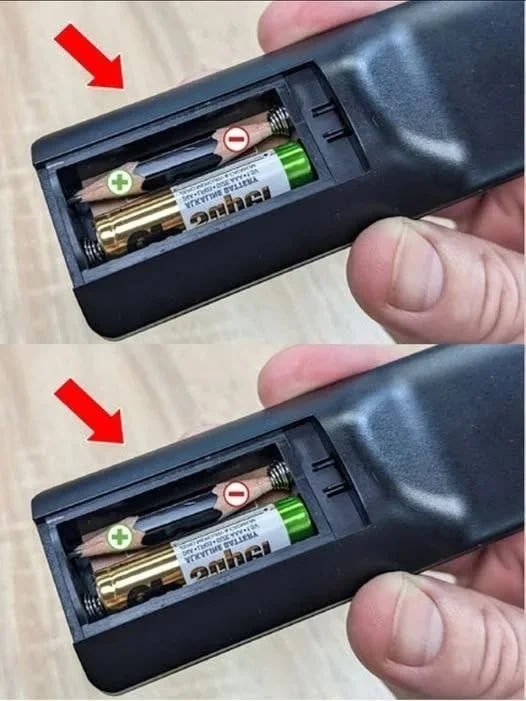
3. Make your own emergency battery
Need a quick battery repair?